ScriptCheckSA 2021.14 - August 2021
New in ScriptCheckSA
 Authorities - Improvements to the Medicines section
The Medicines section on Authorities has been simplified to make it easier to use.
Searching
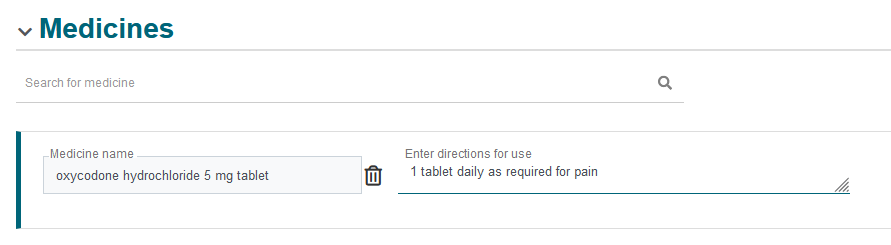
When you create an Authority, the Medicines section displays a Search field.
When searching for a medicine, the search results no longer display the pack size. As a result of this change, there are fewer options that you need to select in the search results.
When you search for a brand-name drug, and select it from the search results, it gets added to the authority as the generic name.
The display of the medicines on the Authority has changed and no longer is displayed in a grid.
Entering directions
Entering directions for a medicine is also easier. You can type the directions in the Enter directions for use text field.
View an Updated Authority
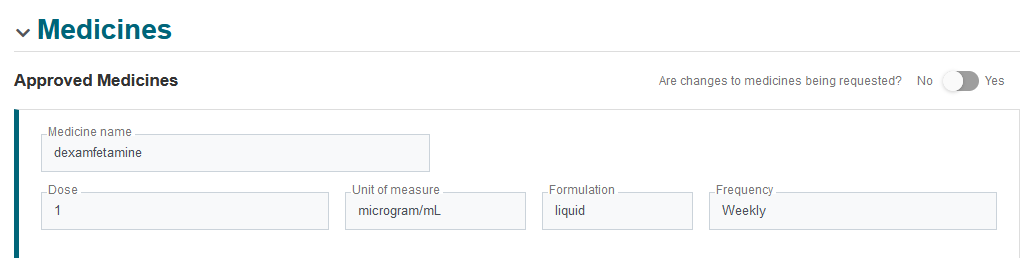
When you view an authority that has been reviewed by the regulator, you will see that the Dose, Unit of Measure, Formulation, and Frequency fields have been populated for each medicine and are read-only.
Request an Amendment/Renewal
The design of the Medicines section has also changed for modifying medicines when amending or renewing. If you need to make changes to the medicines, then turn on the Are changes to medicines being requested? toggle, then either Enter changes to directions for use, or search for and select a new medicine before resubmitting the amended request.

For details on these changes, see View and Update Authorities
Authorities - Display action reason after an authority is saved
The last action reason is now displayed on authorities so that you can find out why that action was selected.
MATOD Authority - Changes to "take-away"
"Take-away" is now known as "Unsupervised doses" in MATOD authorities.
If you need to specify unsupervised doses for a MATOD Authority, there is now a new Will unsupervised doses be prescribed? toggle.
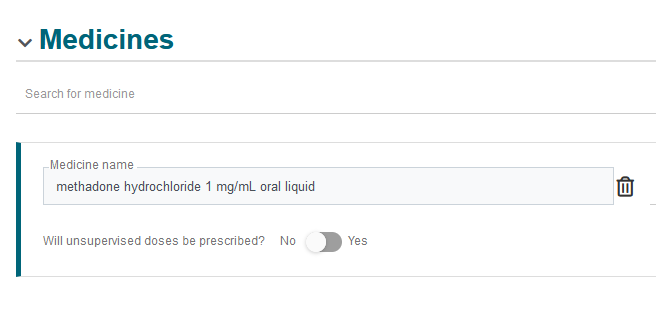
When you set the toggle to Yes, a popup screen displays, which you need to fill in and then Save.
For details, see View and Update Authorities.